
How to install Turn G-code on Linux
A step-by-step guide. Takes 2–3 minutes.
Your download has started
The file turngcode_1.0.0_amd64.deb will appear in your browser's downloads (usually the Downloads folder). Then follow the steps below.
Go to the installation steps ↓
Didn't start? Download again
What you need
| System | Debian 11 or newer, Ubuntu 20.04 or newer and compatible distributions (Linux Mint etc.), 64-bit (amd64). ARM processors (e.g. Raspberry Pi) are not supported. |
| Screen | From 1024×768 taking system scaling into account, 1280×720 or more recommended. Use the monitor's native resolution. See "Screen and scaling" below. |
| Disk space | About 20 MB. |
| Internet | Needed on first launch (the program registers the trial and downloads a key for the generators once) and when you activate a licence key. A Lifetime key works offline after activation. |
| Rights | Installing requires the administrator password (sudo). |
Screen and scaling
The program's windows adapt to the screen: on a small one everything becomes more compact, on a big one larger, and the tool-path preview takes the full height of the window. System scaling is supported too, and the text stays sharp.
| Screen | Scale | How it looks |
|---|---|---|
| 1024×768, 1280×720 | 100% | Compact view: slightly smaller text, everything fits |
| 1366×768 | 100% | Normal view |
| 1920×1080 (Full HD) | 100–150% | Normal or large view, tool-path preview uses the full height |
| 2560×1440 (2K) | 100–150% | Larger text, big preview area |
| 3840×2160 (4K) | 150–200% | Large and sharp |
The main rule: the resolution divided by the scale should be at least 1024×768. For example, Full HD at 150% gives 1280×720, which is fine. A 1366×768 laptop at 125% gives only 1093×614, which is too tight: set it to 100%.
Everything too small? Increase the system scale (125% or 150%). Window does not fit? Lower the scale to 100%.
Where to change it: GNOME, Ubuntu: "Settings" → "Displays" → "Scale". Xfce: "Settings" → "Appearance" → "Fonts" → DPI (96 is 100%, 120 is 125%, 144 is 150%). Other desktops have a similar option in the display settings.
Restart the program after changing the scale or resolution.
Installation step by step
1Download the package
Download the file turngcode_1.0.0_amd64.deb only from this website. It is usually saved to your Downloads folder (~/Downloads).
2Install the package
The easiest way is the terminal. Open a terminal in the folder with the file and run (the leading ./ before the file name is required):
sudo apt install ./turngcode_1.0.0_amd64.deb
Alternatively: double-click the file in your file manager and press "Install" in the software installer that opens.
3Start the program
Find Turn G-code in the application menu (Engineering / Utilities) and start it.
4First launch: start the trial
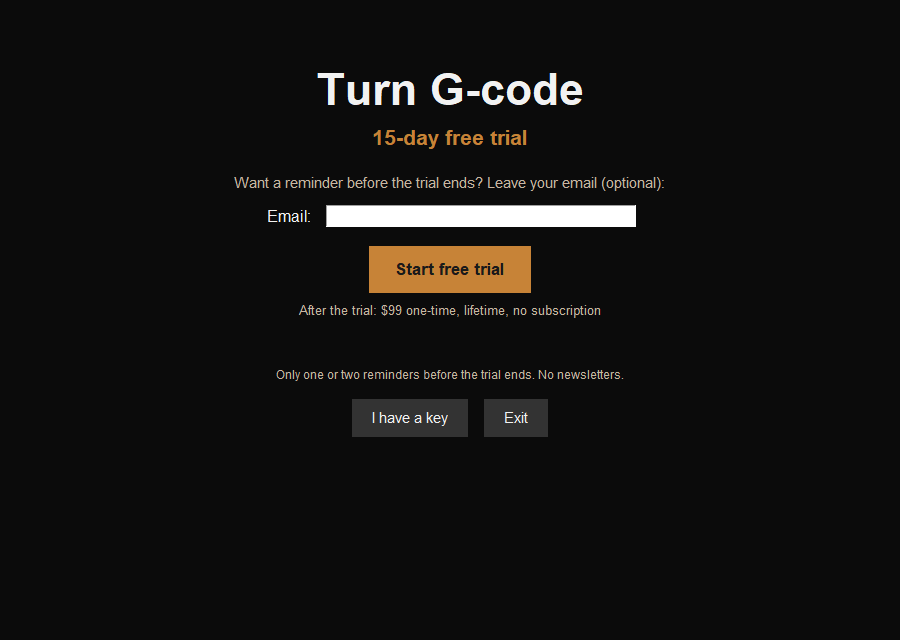
In the first window click "Start free trial": all 12 cycles are available for 15 days. An internet connection is needed: the program registers the trial and downloads a key for the generators once. The licence is bound to this computer.
5After the trial
When the 15 days are over, the program asks for a licence key. A Lifetime key is a one-time $99, no subscription, for two computers: pricing. The key arrives by email after payment. Paste it into the program and click "Activate".
How to verify the checksum (optional)
To make sure the file was not altered, run in the folder with the file:
sha256sum turngcode_1.0.0_amd64.deb
The result must match this value (SHA-256 of version 1.0.0):
eb5aeb68bd66871a74cb3830802c20efe58ecb57ad160105ebcd18e545626df3
If something goes wrong
- "dpkg: dependency problems" error. Run
sudo apt --fix-broken install, then repeat the installation. - "Unable to locate package" with
apt install. Check that you are in the folder with the file and put./before the name. - The window does not fit on the screen, or everything is too small. Change the display scale (see "Screen and scaling" above) and restart the program. A screen of at least 1024×768, taking scaling into account, is required.
- The program says an internet connection is needed. A connection is required on first launch or after activating a key; later it can work offline (for older subscription keys, connect at least once a month to pick up the renewal).
- Other questions: see the Contacts page.
How to uninstall
sudo apt remove turngcode
Or without the terminal: open your distribution's software manager (Software Manager, Software Center or Synaptic), find Turn G-code and click "Remove". Your licence and settings stay in a hidden folder in your user profile and are not removed with the program.